Geospatial (location-aware) information is key to DOC as well as our many visitors. Explore our nature with web maps and free data, check out a selection of mobile and desktop apps, and learn more about DOC's geospatial information.
Discover the outdoors (DTO) shows the activities you can do on conservation land including walking, camping, and hunting. These maps are also embedded on our parks and recreation web pages.
Viewing the map in a full window gives a better experience, including the option to print a map to PDF.
These maps are for reference only, and you shouldn't rely on them for navigation.
Elevation profiles
Elevation profiles are part of DTO maps. You can see elevation profiles on about 60% of our tracks.
Elevation profiles show how a track goes up and down while you walk along it.
On the site, you can trace the elevation profile with your mouse, to see where it relates to on the track.
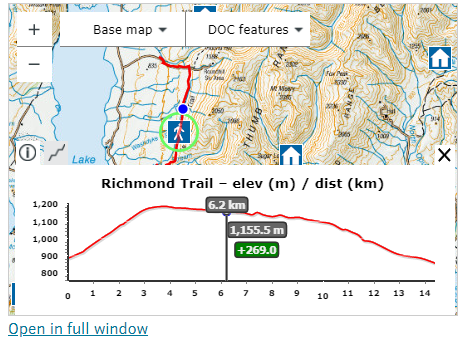
Elevation profile on a track
This could help you decide if a track is suitable for your fitness level, or which direction to walk from (if there are different starting points).
There are some elevation profiles that aren't perfect. Our tracks are made up of smaller tracks sections. When these don't meet at their ends, it causes a jump in the elevation profile. There are also some other data imperfections that affect elevations profiles.
We're continuing work to improve data quality and add more track elevations to the site.
Printing maps from DTO
From DTO, you can print the map you're viewing to a PDF file (and then to paper).
If you're viewing a DTO map that's embedded on a web page, click the "Open in full window" link to get the "Print" option.
- Our general DOC map This viewer is being discontinued. Please use Discover the Outdoors for all maps related information from May 2026.
- Pesticide summaries provide information about DOC’s toxin based predator control
- PF2050 hosts PFNZ2050 projects and current/past DOC predator control areas.
The following are for DOC staff and authorised community groups:
- Trapping to record and report on trapping and ground-based toxin operations
- Whio to record blue duck/whio observations and associated predator control (trapping).
To request a login for the trapping and whio maps contact trappingappsupport@doc.govt.nz.
Read the terms and conditions of using our spatial data. All data is in New Zealand Transverse Mercator (NZTM) projection unless otherwise stated.
APIs for developers
APIs are available for tracks, huts and campsites.
You can download geospatial data from the DOC Open Spatial Data Portal. Data is downloadable in various formats (shp, gdb, kml, GPX) and as reusable APIs (ESRI Rest and GeoJSON).
Data includes:
- public conservation areas, marine reserves, marine mammal sanctuaries
- DOC tracks, huts, campsites
- freedom camping (prohibited and restricted areas)
- recreational hunting permit areas
- deer and pest distribution (NZ)
- ecological districts and regions
- pesticide summary operational areas
- estuarine, freshwater, and marine data
- descriptions and metadata
Open Data portal changes are coming during 2026. We’re upgrading our GIS enterprise platform and taking the opportunity to update our Open Data content and make it consistent across our platforms. From April 2026, you can expect to see some service URL changes and content being deprecated. Check back for updates.
Mobile and desktop apps
There are many options for exploring geospatial data including:
- QGIS – an open source geographic information system.
- Explorer for ArcGIS and ArcGIS Explorer Desktop – a viewer and mapping programme with mobile and desktop versions.
- ArcGIS Online – offers online mapping, supported with data from ESRI.
- My Maps – Google online tool to create and share custom maps.
- Google Earth Pro – view and use a variety of content, including map and terrain data and imagery.
- ArcGIS Earth – explore any part of the world, accommodates 2D and 3D map data formats including KML.
- DNR GPS - GPS download / upload software.
DOC's geospatial work
Geospatial information is vital to DOC, underpinning management decisions, science, policy, accounting and communications.
Our philosophy is to capture accurate data at source and gain maximum benefit from it. Staff across the Department capture, use and add and receive value from geospatial information.
DOC is supported by an award winning Geospatial Services Team. The team develops applications, provides training, support, advice and leadership, and offers a professional geospatial information service including field support, maps and analyses.
The team's work is highly varied, covering all activities of the Department. We have many relationships including with staff New Zealand wide, natural resource sector organisations, industry, education providers, community groups and iwi.
Geospatial Services Team
Email: GIShelp@doc.govt.nz